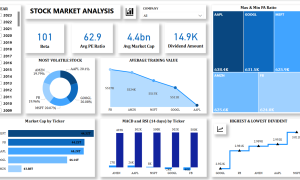
Data visualization has become an indispensable aspect of decision-making in today’s data-driven world. Visualization tools help translate complex datasets into actionable insights, empowering businesses to make informed decisions swiftly. Among the many tools available, Power BI stands out as a leader, but it is essential to understand how it compares to other notable competitors like Tableau, QlikView, and Google Data Studio. Power BI: A Comprehensive Overview Microsoft Power BI is a powerful and user-friendly data visualization tool that integrates seamlessly with the Microsoft ecosystem. It is designed for both beginners and advanced users, offering features like:
- Customizable Dashboards: Create interactive and visually appealing dashboards.
- Integration Capabilities: Seamlessly integrates with tools like Excel, SQL Server, Azure, and third-party platforms.
- AI Insights: Utilize machine learning models and natural language processing for advanced analytics.
- Mobile Access: Access reports on-the-go with mobile-friendly designs.
- Affordable Pricing: Offers a free version and cost-effective Pro and Premium tiers.
Power BI’s strength lies in its flexibility, affordability, and ease of use, making it an ideal choice for organizations of all sizes. Competitors in the Visualization Space 1. Tableau Known for its visual sophistication, Tableau is a favorite among data analysts and professionals.
- Strengths:
- Advanced visualization capabilities with an intuitive drag-and-drop interface.
- Handles large datasets efficiently.
- Strong community support and extensive resources.
- Weaknesses:
- Higher learning curve compared to Power BI.
- Costlier, especially for smaller businesses.
2. QlikView and Qlik Sense QlikView and its successor Qlik Sense provide robust data visualization and analytics capabilities.
- Strengths:
- Associative data engine that allows intuitive exploration of data relationships.
- Flexible deployment options (on-premise or cloud).
- Weaknesses:
- Complex setup and maintenance.
- Higher pricing tiers may not suit smaller organizations.
3. Google Data Studio This free tool from Google is an excellent choice for businesses heavily invested in the Google ecosystem.
- Strengths:
- Completely free to use.
- Integrates seamlessly with Google Analytics, Ads, and BigQuery.
- Easy-to-share reports.
- Weaknesses:
- Limited advanced features.
- Performance can lag with large datasets.
4. Looker Acquired by Google, Looker offers modern data analytics and BI capabilities.
- Strengths:
- SQL-based modeling for precise data querying.
- Scalable for enterprise-grade applications.
- Weaknesses:
- Requires technical expertise.
- High costs.
Key Factors to Consider When Choosing a Visualization Tool
- Ease of Use: Is the tool intuitive for beginners and flexible for advanced users?
- Integration: Does it work seamlessly with your existing tech stack?
- Scalability: Can it handle the growth of your data and business?
- Cost: Does the pricing align with your budget and expected ROI?
- Community Support: Are there ample resources, forums, and support options?
Conclusion While Power BI remains a top contender for its balance of functionality, affordability, and integration, the choice of a visualization tool should align with your organization’s specific needs. Tableau’s advanced visual capabilities, QlikView’s associative data engine, Google Data Studio’s cost-effectiveness, and Looker’s enterprise-grade features all present compelling alternatives. By thoroughly evaluating these tools, businesses can ensure they select a solution that not only meets their current requirements but also supports future growth. Whether you’re a small startup or a large enterprise, there’s a visualization tool out there to help you unlock the true potential of your data.